
Choose a plan and subscribe
Compare Free, Pro, Elite and AI Agent Pro, then subscribe on the web by card or in the Android app.
Video coming soon. The steps below are complete.
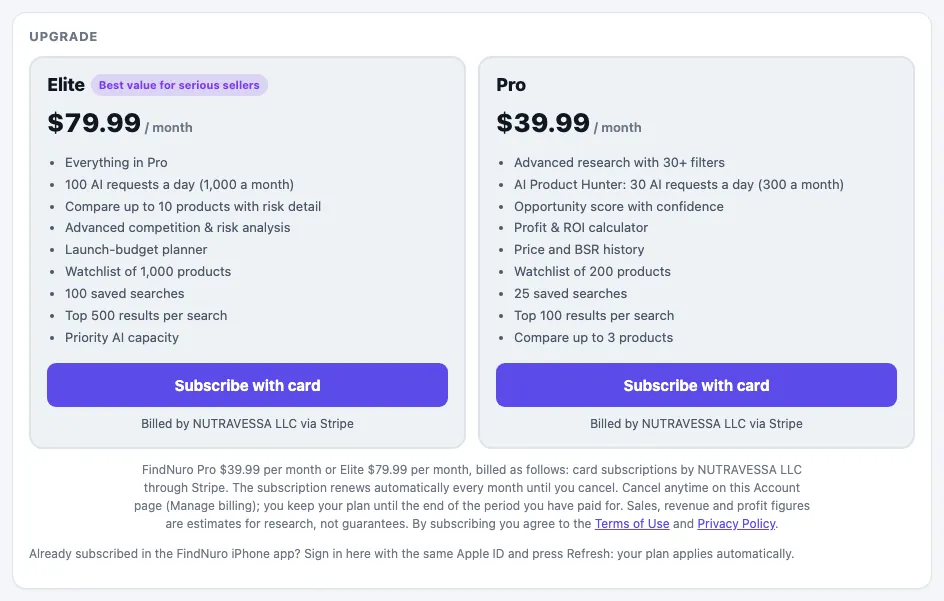
FindNuro has four plans. All prices are in US dollars and billed monthly. There are no yearly plans and no free trials.
| Plan | Price | Best for |
|---|---|---|
| Free | $0 | Trying FindNuro: small searches, a short watchlist, the Profit Calculator |
| Pro | $39.99 / month | New sellers: Opportunity Finder basics, AI Product Hunter, the Chrome extension |
| Elite | $79.99 / month | Serious sellers: all presets, advanced filters, risk analysis, bigger limits |
| AI Agent Pro | $199 / month | The AI Store Manager: everything in Elite plus the AI Agent |
For the full list of limits, see Pro, Elite and AI Agent Pro compared.
Subscribe to Pro or Elite on the web
- Open Pricing (or Account → Subscribe).
- Choose Pro, Elite or AI Agent Pro and press Purchase.
- Complete payment on the secure checkout page.
- Return and tap I’ve paid — create account, then create your account (or sign in if you already have one).
- After sign-in with a paid plan, your dashboard opens.
Subscribe to AI Agent Pro
AI Agent Pro (the AI Store Manager) is sold on the web by card only.
- Open the ✦ AI Agent tab.
- If you haven't yet, read and accept the AI Agent terms once: tick the box and press Accept and continue.
- Read the plan card and press Start AI Store Manager — $199/month.
- Pay on the secure Stripe page. Back in FindNuro, the AI Agent opens. See Start using the AI Agent.
Already on Pro or Elite with a card subscription? Use Account › Subscription & billing › Upgrade to AI Agent Pro instead of starting a second subscription. See Upgrade or downgrade your plan.
Subscribe in the Android app
The FindNuro app on Google Play sells Pro and Elite through Google Play billing. Open the app, go to the plans screen and follow Google's steps. Google Play subscriptions are managed in the Play Store, not on this website.
iPhone app Coming soon
The iPhone app is not on the App Store yet. When it is, Pro and Elite will also be sold through Apple. Until then, subscribe on the web.
One account everywhere
Your plan follows your FindNuro account, not the device. Sign in with the same method on the web, the Android app and the Chrome extension, and your plan, watchlist and saved searches are there.
Frequently asked questions
Is there a free trial?
No. You can use the Free plan for as long as you like, and cancel a paid plan at any time.
Can I pay yearly?
No. All plans are billed monthly.
Can I get a refund?
Web subscriptions are non-refundable, including partial months. When you cancel, you keep your plan until the end of the period you paid for. Google Play refunds follow Google's policy. See the Terms.
Which plan should I start with?
If you are researching your first product, start with Pro. Move to Elite when you need all Opportunity Finder presets, advanced filters, risk analysis or more AI requests. Choose AI Agent Pro if you want the AI Agent to work with your Amazon store.